Stop managing weekly production in spreadsheets
FoodieManager automatically calculates ingredient requirements, food costs, shopping lists, and kitchen production sheets for meal prep businesses. Know exactly what to buy, what to cook, and how much profit you'll make each week.
No credit card required. Cancel anytime.
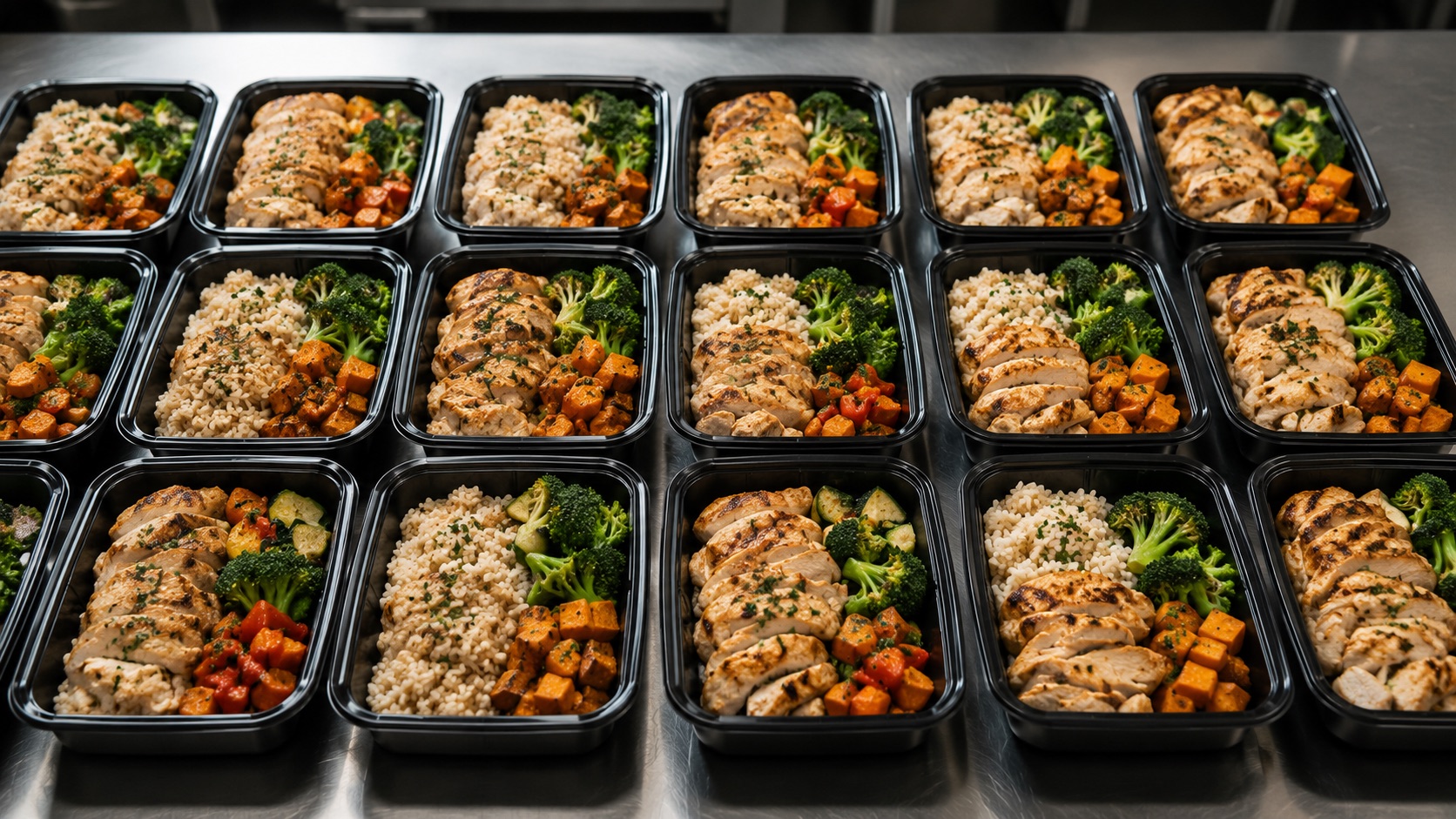
Your production plan lives in five places at once
Spreadsheets, Google Sheets, whiteboards, paper production sheets, and mental math. It works — until you grow. Then it costs you hours every week and quietly eats your margin.

You rebuild the same math every week
Every new menu means re-doing ingredient totals, unit conversions, and shopping quantities by hand.
You over-order or run short
Guesswork on quantities means wasted product in the walk-in — or an emergency run to the store mid-prep.
You don't know your real margin
Selling price is easy. Actual cost per meal — after every ingredient, unit, and bit of waste — is buried in a spreadsheet.
Nothing is connected
A recipe change doesn't update your shopping list, your production sheet, or your food cost. You update all three by hand.
It doesn't move off your laptop
Your kitchen runs on a printed sheet that's already out of date, while the ‘source of truth' lives in a tab only you can open.
Onboarding staff is painful
The whole operation is in your head and a fragile workbook. Handing off a shift means hand-holding.
Plan the week once. Everything else calculates itself.
Change a quantity and your shopping list, production sheet, and food cost all update together. No more keeping three documents in sync by hand.
- ✓Enter each recipe once, with real ingredient costs and units.
- ✓Drop meals into a week with the quantities you're producing.
- ✓FoodieManager scales every recipe, rolls up the ingredients, and converts the units for you.
- ✓Out comes a supplier-grouped shopping list, a kitchen production sheet, and your true margin — before you cook.
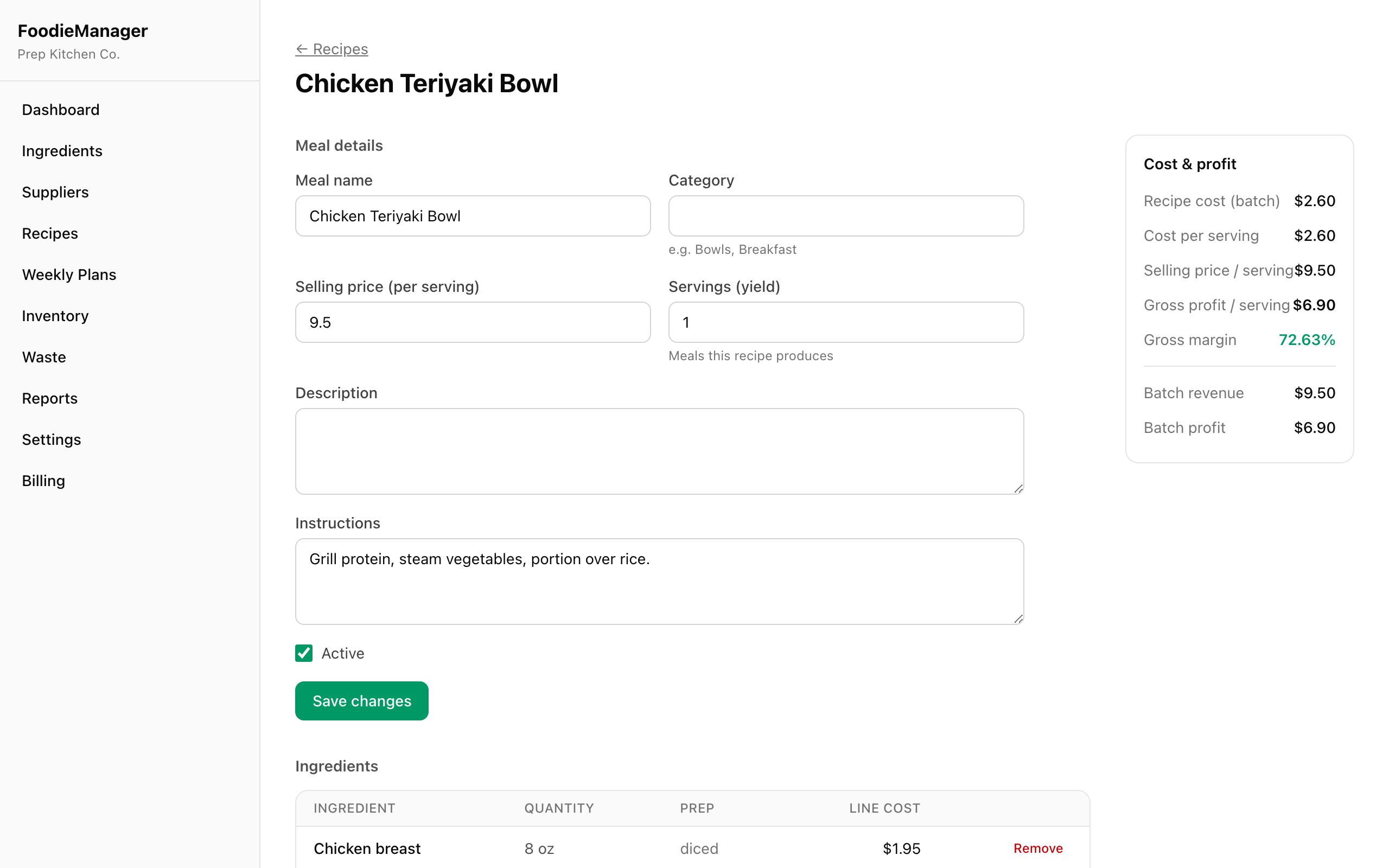
The tools that replace your whole workbook
Purpose-built for meal prep operations — not a generic spreadsheet with your data poured into it.
Ingredient Management
One list of every ingredient with cost per unit, supplier, and unit of measure. Update a price once; every recipe reprices.
Recipe Costing
Enter quantities in any unit. See cost per serving, gross profit, and margin the moment you add an ingredient.
Weekly Menu Planning
Build a production week, set quantities per meal, and copy last week in one click.
Production Sheets
A printable kitchen sheet: what to make, how much, per-meal ingredient amounts, and prep notes.
Shopping List Generation
Every ingredient rolled up across the menu, unit-converted, grouped by supplier, with estimated cost.
Food Cost Tracking
Real cost per meal and per week — after every ingredient, unit conversion, and waste percentage.
Profit Analysis
Weekly revenue, food cost, gross profit, and margin. See your most and least profitable meals.
Waste Tracking
Log spoilage and trim, see what it's costing you, and tighten the recipes that leak margin.
Inventory Lite
Track what's on hand so your shopping list only buys the difference — no double-ordering.
Team Access
Roles for owners, managers, and kitchen staff. Staff see production sheets and shopping lists — nothing else.
AI Margin Coach
AI reads a recipe's real cost breakdown and suggests specific ways to lift the margin — re-portion, substitute, or reprice. (Pro & Business)
Save time. Cut waste. Protect margin.
Stop rebuilding shopping lists and production sheets by hand. Plan once and print.
Every unit conversion and waste percentage handled automatically — no more rounded guesses.
Netting against on-hand inventory means you only purchase what the week actually needs.
See gross profit per meal and per week while you plan — not after the invoices land.
From menu to margin in four steps
Add your ingredients & recipes
Enter ingredients with real costs and units, then build recipes. FoodieManager costs each one and shows your margin instantly.
Plan the production week
Drop meals into the week and set how many of each you're making. Copy last week to start in seconds.
Generate the list & the sheet
One click turns the plan into a supplier-grouped shopping list and a printable kitchen production sheet.
See profit before you prep
Weekly revenue, food cost, and margin are calculated for you — so you fix a thin-margin meal before it goes on the line.
The whole week, on one screen
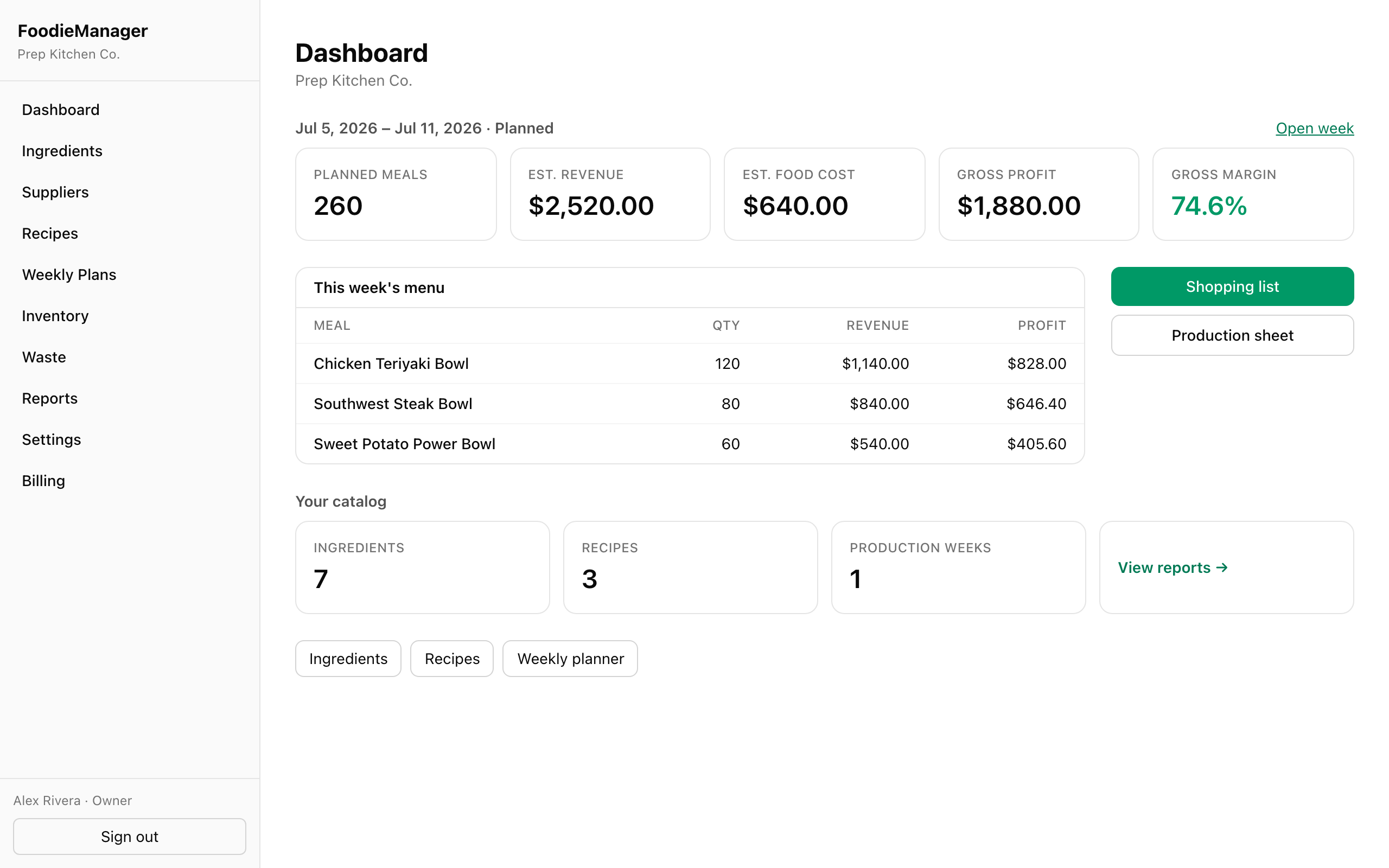
This week at a glance
Planned meals, revenue, food cost, and margin the moment you open the app.
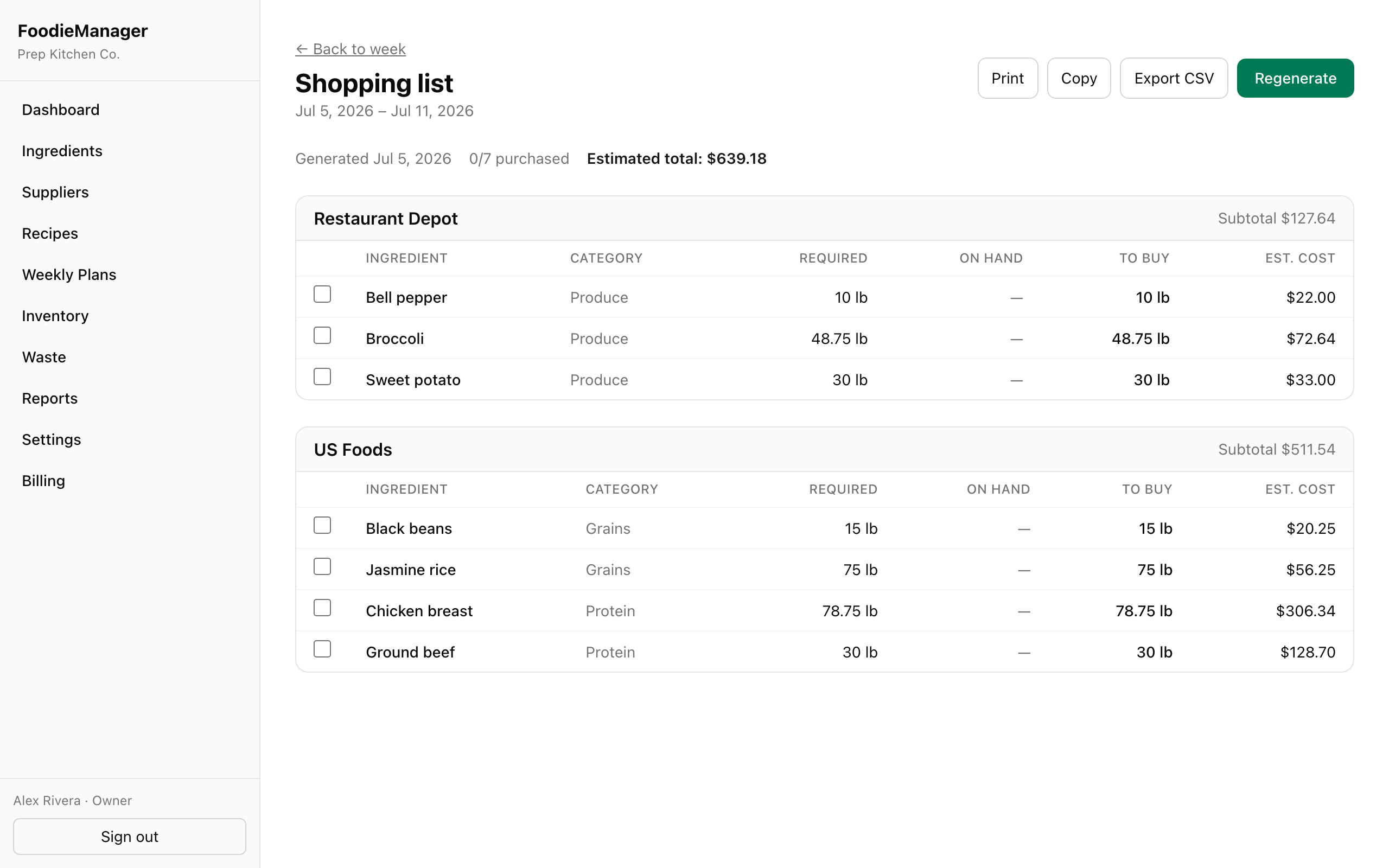
Grouped by supplier, priced, printable
Every ingredient rolled up across your menu, netted against what's on hand, ready to send.
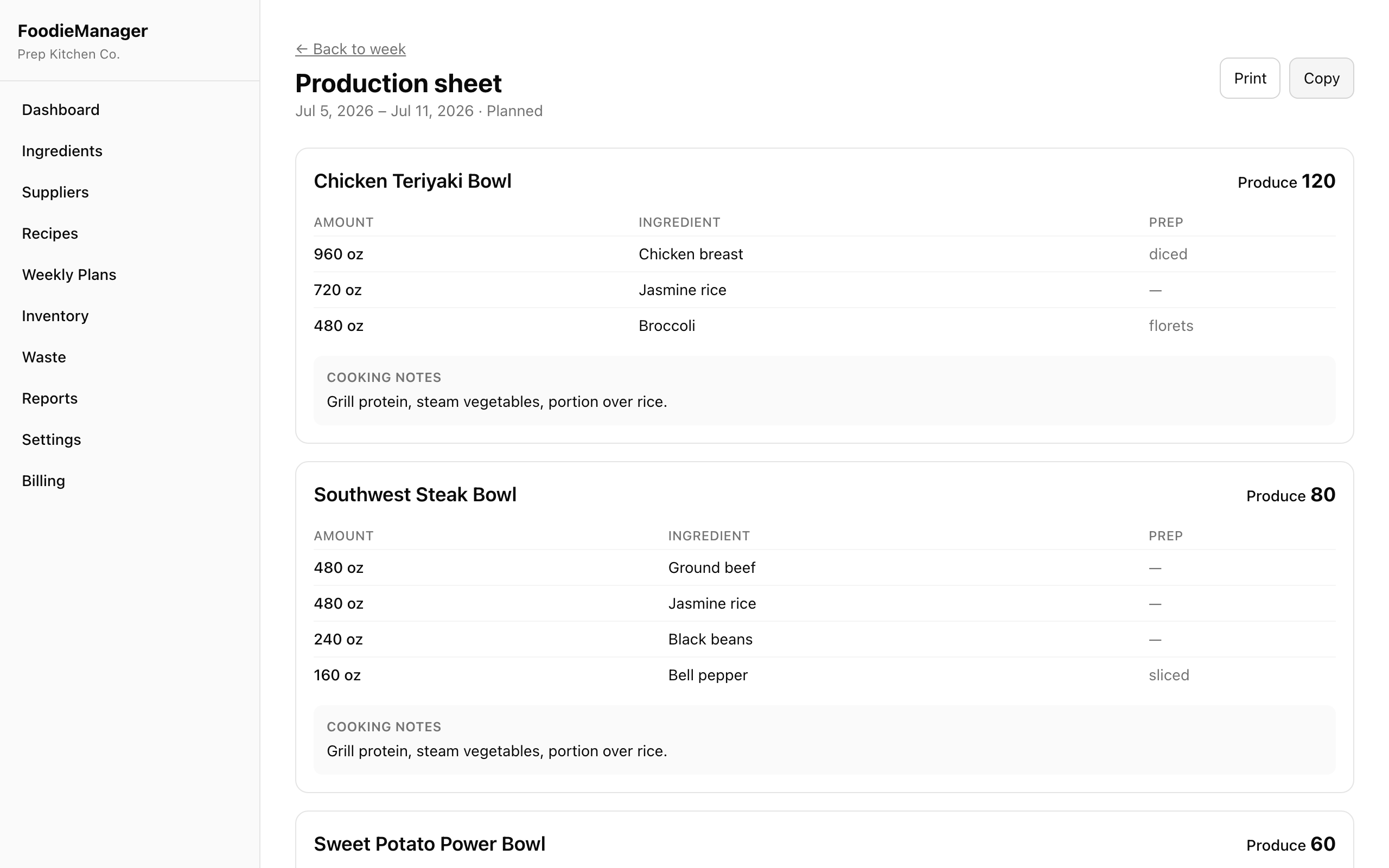
A clean sheet for the line
What to make, how much, and the total ingredients to prep — print it for the kitchen.
What's the spreadsheet costing you?
Move the sliders to your operation. Most owners find FoodieManager pays for itself many times over in the first month.
- Time back (18 hrs/mo)
- $546
- Tighter ordering & less waste
- $346
- Net after Pro plan
- $813
Estimate only. Assumes ~70% less time on manual planning and a ~5% reduction in food spend from tighter purchasing and waste tracking. Your numbers will vary.
Built for how meal prep actually runs
“Sunday planning went from four hours in a spreadsheet to about thirty minutes. The shopping list alone is worth it.”
“I finally know my real margin per meal. I re-priced two dishes the first week and stopped losing money on them.”
“Handing a shift to my kitchen lead is easy now — they open the production sheet and go. Nothing lives in my head anymore.”
Plans that scale with your kitchen
Every plan starts with a 14-day free trial. No credit card to start. Cancel anytime.
Starter
For a solo operator replacing spreadsheets.
- ✓Ingredients & suppliers
- ✓Recipe costing
- ✓Up to 15 recipes
- ✓Up to 4 planned weeks
- ✓Shopping lists & production sheets
Pro
Most popularFor a growing meal-prep business.
- ✓Everything in Starter
- ✓Unlimited recipes & weeks
- ✓Reports & analytics
- ✓AI margin insights
Business
For a commercial kitchen running at scale.
- ✓Everything in Pro
- ✓Inventory tracking
- ✓Waste tracking
- ✓Team members
Prices in USD. Starter fits a solo operator; Pro unlocks unlimited recipes, weeks & reports; Business adds inventory, waste tracking & team members.
Questions, answered
Do I have to move off my spreadsheet all at once?+
No. Add a handful of ingredients and one recipe, plan a single week, and generate a shopping list. Most operators run one week in parallel to see the difference, then switch.
How long until I'm actually using it?+
You can cost your first recipe in minutes. A full week — ingredients, recipes, quantities, shopping list, and production sheet — typically takes an afternoon to set up, then a few minutes each week after.
Does it handle unit conversions?+
Yes. Enter a recipe in ounces and price the ingredient by the pound — FoodieManager converts everything (weight and volume) and rolls it up on the shopping list automatically.
Can it show my real food cost and margin?+
That's the point. It calculates cost per serving and per week from your actual ingredient costs, unit conversions, and waste percentages — and shows gross profit and margin before you cook.
Can my kitchen staff use it without seeing everything?+
Yes. Kitchen Staff see production sheets and shopping lists; Managers edit operational data; Owners control settings, team, and billing.
Can I print or export?+
Production sheets and shopping lists are print-friendly, and shopping lists export to CSV so you can send them straight to a supplier.
What if I run more than one location?+
Each account is scoped to one organization today, and the data model is built to support multi-location down the road. Talk to us if you're running several kitchens.
Is there a contract?+
No. It's month-to-month on a 14-day free trial. Cancel anytime from the billing page.

Run next week's production without a spreadsheet
Set up your ingredients and recipes today, and generate your first shopping list and production sheet in an afternoon.
No credit card required.